


- Home
- Services
- Parks and Recreation
- Parks Reservations
Parks Reservations
Seasonal reservations are available for picnic shelters, sports fields and special-use events.
Make a reservation
- Online Reservations
- Phone and Email Reservations
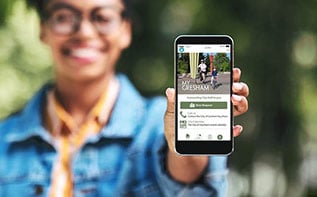
Reserve a sports field or picnic shelter at a Gresham park with CommunityPass.
Steps to make a reservation
- Select "Make a Reservation" and choose Picnic Shelter or Sports Field.
- Account: Confirm your account details.
- Permit: Select the shelter or field you want to reserve. Read the policies and agreements. By acknowledging parks policies, the City is permitting you to use the park facility at the time and date you’ve selected.
- Fees and Payment: Choose your payment method and continue.
- Find a park facility
- At the top of the screen in the gray menu bar, select "Facilities.”
- Select “All Facilities” from the drop-down menu to view a list of Gresham parks.
- Choose a park.
- On the park’s page, you’ll see a description, amenities, and available "zones" (sports fields or shelters). Click the calendar icon to check availability.
- To make a reservation, click the “Reserve Now” button.
- Making a Reservation. Note: You will need to select the park again to confirm your reservation.
Other features on CommunityPass
- View all registrations
- View payment information
- View messages
- Receive help
Staff can help with park and sports field reservations, 8:00 am-5:00 pm, Monday-Friday.
- Phone: 503-618-2300
- Email: ParksReservations@GreshamOregon.gov
Reservation fees
Seasonal reservations
Now accepting reservations.
- Reservation season: May 1 – Sept. 30
- First-come, first-served: Oct. 1 – April 30
Reservation sessions
- Morning session: 9:00 am – 2:30 pm
- Afternoon session: 3:30 pm – 9:00 pm
- The entire day: Make two reservations, one for each time block.
Fees
- Resident: $50 per session
- Non-resident: $100 per session
Available picnic shelters
Maximum capacity of 100 people per shelter:
- Main City Park: 219 South Main Ave.
- Red Sunset Park: 2403 NE Red Sunset Drive
Maximum capacity of 25 people per shelter:
- Shane T. Bemis Nature Park: 757 Gabbert Road
Maximum capacity of 35 people per shelter:
- Gradin Sports Park: 2303 SE Palmquist Road
Maximum capacity of 50 people per shelter:
- Nadaka Nature Park: 17615 NE Glisan St.
Reservations are accepted Monday, February 2 at noon.
- Reservation season: April 1 - Oct. 31, 8:00 am-10:00 pm
- First-come, first-served: Nov. 1 - March 31
Gradin Community Sports Park
Soccer and softball fields (per field, per hour)
- Youth resident: $35
- Youth non-resident: $70
- Adult resident: $35
- Adult non-resident: $70
Sports facilities at all parks, except Gradin Community Sports Park
Soccer and softball fields (per field, per hour)
- Recreation user (per hour): $15
- Youth organized sport group (per hour)
- Resident: $15
- Non-resident: $25
- Adult organized sport group (per hour)
- Resident: $20
- Non-resident: $30
- For profit (per hour) $30
Rules
- There is a 1 hour minimum reservation. An hour may stop or start on the hour or half hour.
- There is a 4 hour maximum reservation for pickleball courts at Gradin Community Sports Park, unless the reservation is for a tournament or event.
- Fees are due at the time of reservation for recreational users, tournaments and for profits.
- Field reservations are non-refundable due to weather.
- Cancellations may be made in writing no later than two weeks from the date of the reservation. Refunds or cancellations will be paid within 60 days.
Sports fields available to rent
Special events held in a City park or on City-owned property require an approved application and City permit. A special event application is required if your event includes any of the following:
- 100 or more attendees
- Amplified sound
- Catering
- Fundraising, concerts, athletic races, or events
- Tents or staging
- Street closure
- Alcoholic beverages
Planning an event?
Apply a minimum of 30 days before the event. Larger events may require more notice.
- For assistance, contact us at ParkQuestions@GreshamOregon.gov or call 503-618-2300
Fees
- Special event application: $60
- This fee is non-refundable.
- Security deposit (refundable): $250
- Organization participation fee, percent of event entry fee: 5%
- City support staff service fee, per hour, per staff person: $72
- Park reservation fee for a half day:
- Resident $50
- Non-resident: $100
- Morning session: 9:00 am - 2:30 pm
- Afternoon session: 3:30 pm - 9:00 pm